Appearance
Metadata model
The TREAT-NMD Core Datasets are described on a dedicated web app. The content of this website is completely defined in the JSON file library.json. This structure of this file, which should serve as source for any tools operating on data in the TREAT-NMD data model, is described in the following. Note that this document only contains the technical and imlementation details that are not described in the general introduction to the datasets, so please read that document first.
Overview
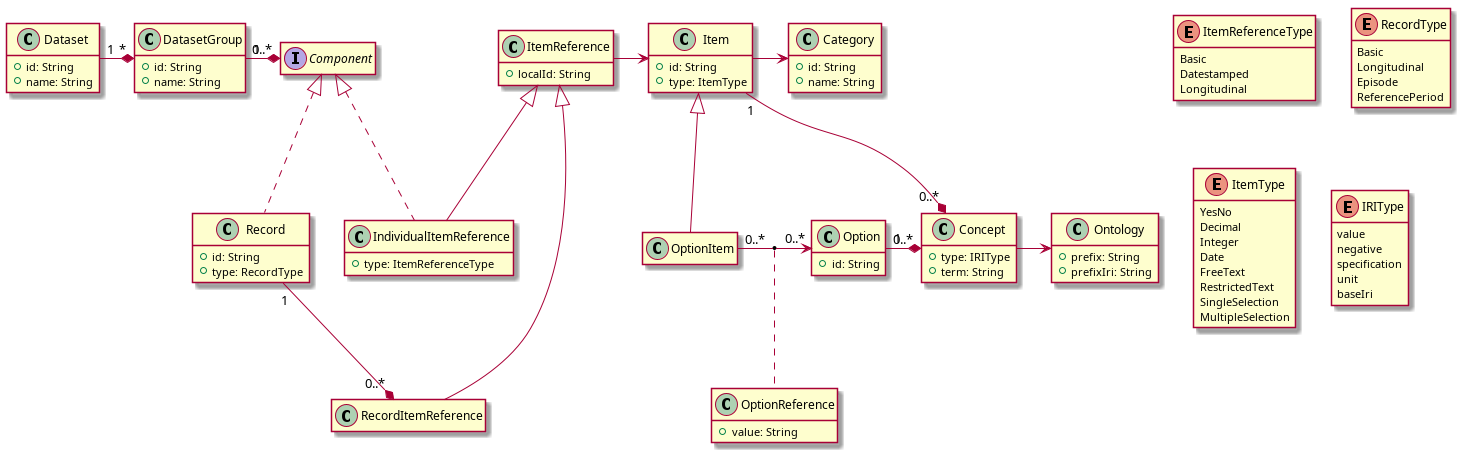
The following UML diagram shows an overview of the conceptual model of the dataset specifaction. In the JSON file, relations between the objects are implemented using references to the id properties.
Classes
In the following, the classes are described on more detail, although the JSON objects may contain further properties than mentioned here.
Dataset
This class describes a disease-specific dataset, e.g. SMA, DMD or LGMD. Since the core datasets should be harmonized as much as possible, all items are defined in a shared library and the datasets contain references to the shared items.
DatasetGroup
Each component in a dataset belongs to one group. The groups determine how the components are presented; e.g. the specification website contains one page per group. The groups have no further semantic significance.
ItemReference and Record
Items are included in a disease-specific dataset through an ItemReference object. This can be either directly through an instance of IndividualItemReference, or through a Record which in turn contains a RecordItemReference. Individual item references and records are contained in an ordered list in a DatasetGroup, which is modeled through the Component interface.
Item
This class defines the semantics of an item. Every item has one of eight possible item types. In the UML diagram, single selection and multiple selection items are represented as OptionItem; all other items are represented by the Item class for simplicity, as they do not contain further properties or relations.
Every item belongs to an instance of Category. Similar to dataset groups, categories group related items for convenience and have no semantic relevance. Currently, the item library is not displayed on the specification website, therefore the categories are only visible in the editor.
Option and OptionReference
Single selection and multiple selection items have a fixed list of possible values. The semantics of each possible value is defined in an instance of Option. Options are shared among items to ensure that semantics and mappings do not have to be repeated.
The inclusion of an option in an item is defined through an ordered list of OptionReference instances. By default, the ID of the option is used as item value, but this can overriden through the value property of OptionReference.
Concept and Ontology
Items and options can be mapped to terms in ontologies using IRIs. This is modeled using the Concept class. The property type defines the role of the mapping:
Value: Concepts of this type define the main meaning of the item or option. For many items and options, this will be the only concept.Negative: When an item or option has a positive as well as a negative interpretation, for instance "the individual is able to walk" and "the individual is unable to walk", a concept of this type can be added in addition to the main value to map the opposite meaning.Specification: This type of concept defines how a value is obtained, for example a description of a motor function test.Unit: A concept with this role defines the unit of a measurement, e.g. "kilogram". Although mostly items will have this kind of concept, it may also apply to options, e.g. when a value can be provided in multiple different units.BaseIri: This type is used when instead of a full IRI, a base IRI is provided which is prepended to a value of a restricted text item to form a full IRI.
Every item and option can have multiple concepts, but at most one of each role.
The term property of a concept does not contain a full IRI, but only the last part, e.g. 0001324 of the HPO term http://purl.obolibrary.org/obo/HP_0001324. The base IRI, e.g. http://purl.obolibrary.org/obo/HP_ for HPO, is defined in an Ontology object. This object also defines a prefix such as HP which is used to display terms.
Tools
Editor
The file editor.html contains a basic editor for the JSON file based on JSON editor. It is configured through the JSON schema in schema.json. The editor needs to read the JSON and schema files in the same directory. When opening the local HTML file with a browser (please rename the file above to end in .html if you download it), this is normally disallowed for security reasons. Therefore, open with Chrome or Chromium like this:
chromium --allow-file-access-from-files editor.htmlIn Firefox, the setting security.fileuri.strict_origin_policy can be set to false.
Zod schema
The file schema.ts contains schema definitions based on Zod. It can be used to partially validate the JSON file; however a number of constraints as well as referential integrity are not checked.
TypeScript model
Based on the Zod schema, the file library.ts contains classes that perform further validation on the JSON data and enable using the data.